Why Do Our Business Reports Show Different Numbers?
See why CRM, finance, and operations reports disagree, then use four practical tests to decide which number should be trusted across the business today.
Two reports can be accurate and still disagree. A CRM may count opportunities, finance may count issued invoices, and operations may count completed jobs. The totals look comparable, but they describe different events.
That confusion is one sign of business systems that no longer work as one. The dashboard is rarely the immediate problem. The unanswered business question is more basic: what does each number mean, and who has authority to approve that meaning?
To settle the disagreement, compare one KPI across its definition, owner, cut-off time, and source system. This gives the owner a decision rule everyone can follow, without creating another spreadsheet that competes with the existing reports.
Key Takeaways
- Different numbers often measure different business events.
- Choose one authority for each decision, not one database for every record.
- Reconcile definition, owner, cut-off time, and source system before changing software.
- Keep rejected definitions and known exceptions beside the approved reporting rule.
Why do CRM, finance, and operations reports disagree?
Reports disagree when systems count different events, apply different status rules, or close their reporting periods at different times. Start by comparing the meaning and timing behind each total. Do not assume a dashboard error, or force the figures to match before you know what each one represents.
A CRM usually reports commercial intent, perhaps when a salesperson marks a deal won. Accounting records a financial event, such as an issued or paid invoice. Operations records delivery when a booking finishes or a job closes. If all three figures are labelled “revenue”, the reports conflict before anyone exports a file.
Timing creates another gap. A salesperson can close a deal at 5:30 pm, after finance has exported its daily report. A late cancellation may reach operations today and accounting tomorrow. Monthly figures differ until every system receives the same event. Which report is wrong? Sometimes none of them is.
The unit of measure can differ too. Sales may show contract value, finance may show net invoice value after credit notes, and operations may show job count. A currency conversion or tax treatment can widen the gap. Compare like with like before investigating how data moved between systems.
Manual updates add uncertainty. When staff copy customer details, values, or status fields, each copy can make a different claim. In 2026, MuleSoft found that 95% of surveyed organisations faced integration challenges (MuleSoft, Connectivity Benchmark Report, 2026). That broad finding supports checking transfer gaps, while the duplicate data entry diagnosis helps locate them.
Choose the number that fits the decision
Trust the number whose definition matches the decision, follows an agreed rule, and has an accountable owner. Authority depends on the question, not the most polished dashboard. A pipeline forecast and an issued-revenue total can both be valid because they support different decisions.
Begin with the decision the number must support. “How did sales perform?” is too broad. “What value of invoices was issued for completed work in June?” names the event and period. Finance may own that answer, while the CRM remains authoritative for a pipeline forecast.
One approved answer per decision is enough. The CRM can own qualified pipeline, accounting can own issued invoices, and operations can own completed work. They do not need to produce one universal total.
Use the Four-Test Reconciliation
The Four-Test Reconciliation exposes the rule behind a mismatch before anyone adds a connection or another report. Compare one KPI across its definition, owner, cut-off time, and source system. The four answers show whether the disagreement comes from meaning, governance, timing, or the underlying record.
Choose one disputed KPI. Put the CRM, accounting report, and management spreadsheet side by side. Record what business event each tool counts and when it counts it.
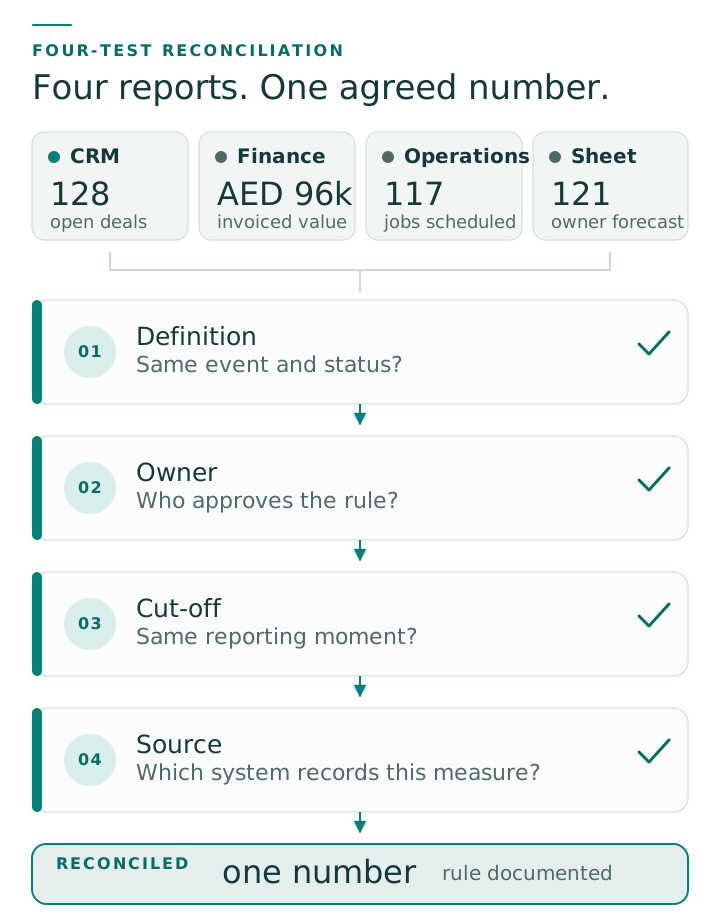
Four-Test Reconciliation example
This is an illustrative UAE service-business workflow. It does not represent a named client or measured result.
| Test | CRM | Accounting | Management spreadsheet | Decision |
|---|---|---|---|---|
| Definition | Deals marked won | Invoices issued for completed work | Paid invoices plus manual adjustments | Use “issued revenue” for the monthly revenue review |
| Owner | Sales manager | Finance owner | Operations coordinator | Finance owner approves the KPI rule |
| Cut-off time | 11:59 pm on 30 June | Posting close at noon on 2 July | Updated when the coordinator prepares the meeting | Use the finance close and label the report accordingly |
| Source system | CRM opportunity record | Accounting invoice ledger | Copied values from both tools | Accounting is authoritative for issued revenue |
Test 1: Definition
Write the KPI as a complete sentence. Name the business event and its status, then specify exclusions, currency treatment, and period. “Revenue” may mean won work, issued invoices, paid cash, or completed delivery. Those measures should not share one label.
Test 2: Owner
Name one role with authority to approve the definition and any exceptions. The report builder may be someone else. For issued revenue, finance might own the rule while an operations coordinator prepares the pack.
Test 3: Cut-off time
Record the exact time and timezone when the period closes. State how the business treats late invoices, cancellations, refunds, and backdated changes. The cut-off turns a moving total into a snapshot that another person can reproduce.
Test 4: Source system
Choose the system whose record creates or confirms the event. A spreadsheet may present the result without owning it. When staff adjust the source record, capture the reason and approver there or in a linked exception log.
If the chosen source cannot pass data reliably, a CRM and booking integration may remove copying. Confirm the reporting rule first. A faster connection cannot resolve a definition that the business has not agreed.
Does a small business need a single source of truth?
A small business needs one authority for each important event, not every record inside one database. Assign the CRM, accounting platform, booking tool, or another controlled system to the event it creates or confirms. Then preserve that authority when reports combine records from several places.
An authority map records which system owns each business event. Customer contact details may belong in the CRM. Posted invoices belong in accounting, while completed appointments may belong in the booking or delivery system.
Several systems can therefore support one reliable view of the business. Combined reports must preserve each measure’s definition and ownership. A spreadsheet can present the result, but it should not become an ungoverned replacement ledger.
If the current tools cannot support the approved rule, record that limitation. Keep this reconciliation separate from the earlier keep-or-change software decision. Choosing the authoritative number does not decide whether a tool should be integrated or replaced.
How do you stop reports drifting apart again?
Keep reconciled reports aligned by storing the approved definition, owner, cut-off, and source beside each report. Review those four controls whenever a workflow, status, system, or reporting calendar changes. This makes drift visible before a familiar report quietly starts answering a different question.
Create a short KPI register. For each management number, record its plain-language definition, accountable owner, reporting calendar, source system, and known exceptions. Include the report location and last approval date. Managers are more likely to use a register they can scan quickly.
Use reconciliation as a business acceptance test. Before a monthly report reaches the owner, the named KPI owner confirms that all four tests still hold. This check answers more than asking staff whether the dashboard “looks about right.”
A wider business systems audit can uncover access, supplier, renewal, and recovery risks around the same reports. That audit documents the current state. It should not become a software purchasing exercise.
Frequently asked questions
These answers resolve common reporting disputes by returning each one to the agreed definition, cut-off, owner, and source. The same rule applies whether the mismatch appears in a CRM export, finance pack, dashboard, or spreadsheet. Settle the business meaning first, then inspect the transfer.
Why does the CRM total exceed accounting revenue?
The CRM may count won deals before finance issues invoices. Its total can also include cancelled, deferred, or partially billed work. Compare the definitions and cut-offs first, then trace any transfer delay. The higher total is not evidence that finance missed revenue until both reports describe the same event and period.
Can a spreadsheet be the source of truth?
Yes, when the spreadsheet creates an approved business record and has clear ownership, access, change control, and recovery. Combining exports alone does not make it authoritative. If formulas, adjustments, or mappings exist only in one person’s copy, the business has created another reporting risk rather than a dependable source.
How often should KPI definitions be reviewed?
Review definitions whenever a workflow, system, status, owner, or reporting calendar changes. Check decision-critical KPIs before each reporting cycle. Stable measures still need a periodic owner review, because quiet changes to field use, tax treatment, or cut-off practice can alter the result without changing the report’s label.
What should you do when business reports show different numbers?
When business reports show different numbers, reconcile one disputed KPI before asking staff to rebuild a dashboard. Write the decision question, identify what each total counts, and apply the four tests. The result should be an approved rule another manager can reproduce without relying on memory.
Write the decision question, then compare the definition, owner, cut-off time, and source system across the reports. Once the business approves the rule and records its exceptions, it can judge whether any technical correction is necessary.
The broader guide to fixing disconnected business systems places this reporting problem within the full customer and staff workflow. Begin with the number that changes a real decision. That gives the next management meeting an agreed starting point.
Sources
- MuleSoft, 2026 Connectivity Benchmark Report, 2026, retrieved 2026-07-16, https://www.mulesoft.com/lp/reports/connectivity-benchmark